AI Visibility
Written By seorocket
Last updated 5 months ago
AI Visibility answers one of the most important questions for modern businesses: when someone asks ChatGPT, Gemini, or another AI assistant about your industry, does your brand come up?
Traditional SEO tracks how you rank on Google. AI Visibility goes further, monitoring your brand across 5 major AI platforms and showing you exactly when you appear, how you're described, and how you stack up against competitors. As more people turn to AI assistants for recommendations and research, this kind of visibility is becoming just as important as your search rankings.
You can find AI Visibility in the left sidebar under Analytics → AI Visibility.
Getting Started
The first time you open AI Visibility, a short setup wizard walks you through everything. You'll provide:
Your brand name and any alternate names your business goes by
Your top competitors
Once you've filled that in, SEO Rocket automatically generates 20 monitoring questions tailored to your business. These are pulled directly from your existing business profile, niche, location, and keywords — no manual work needed.
After setup, everything runs automatically every week.
Platforms Monitored
SEO Rocket tracks your brand across 5 AI platforms:
ChatGPT
Perplexity
Gemini
Google AI
Microsoft Copilot
Your 20 Monitoring Questions
Every week, 20 questions are sent to each AI platform on your behalf. These questions are organized into five categories to give you a complete picture of how your brand appears across different types of searches:
Your Dashboard
Score Cards

At the top of the dashboard, you'll see four score cards that summarize your AI visibility at a glance:
GEO Score (0–100): Your overall AI visibility score. Higher means AI platforms mention you more often and more positively.
Visibility Score: The percentage of AI responses that mentioned your brand at all.
Share of Voice: Out of all the times AI mentioned you or your competitors, what percentage was yours.
Citation Rate: How often AI platforms linked to your website when they mentioned you.
Each card includes a trend arrow so you can see at a glance whether you're moving up or down week over week.
Platform Breakdown
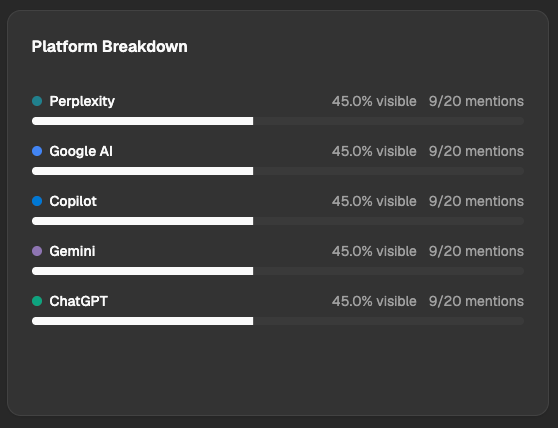
A bar chart shows your visibility score on each platform separately. This helps you quickly identify where you're strong (for example, high visibility on Perplexity) and where you have room to grow (for example, low visibility on Microsoft Copilot). Each platform shows both your visibility percentage and how many questions you appeared in out of the total asked.
Trend Chart
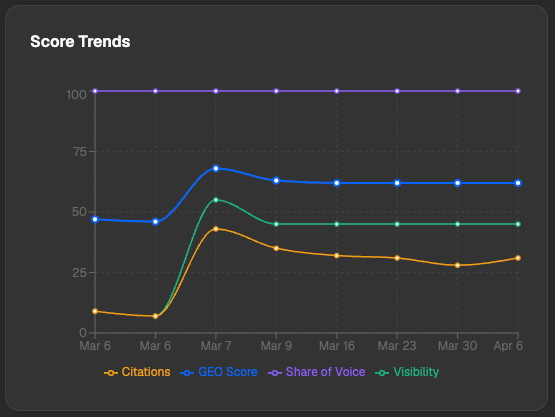
A line graph tracks how your GEO Score has changed week by week. Use this to see whether your content improvements are actually moving the needle over time.
Recent Mentions Feed
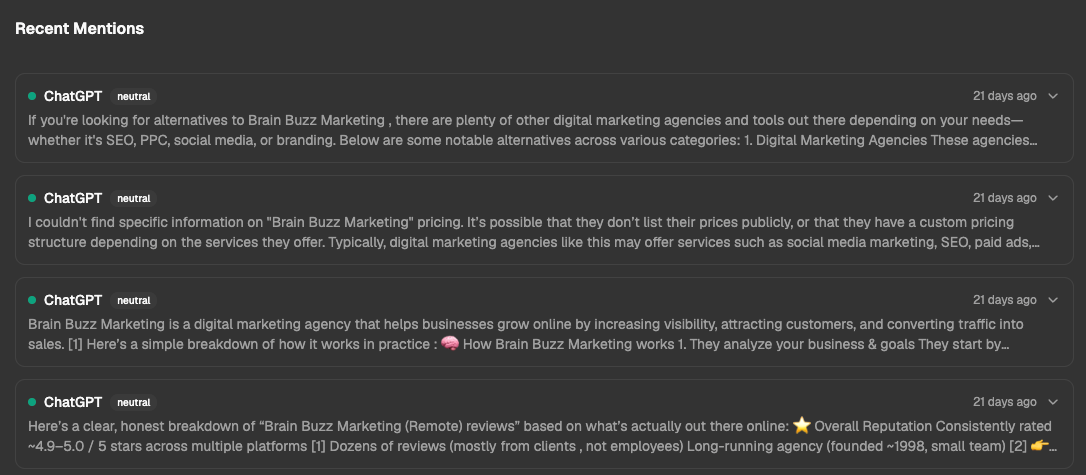
At the bottom of the dashboard, a live feed shows actual AI responses that mentioned your brand. Each mention includes the platform it came from, the sentiment (positive, neutral, or negative), and the full response text. You can expand any mention to read exactly what the AI said about you.
Prompt Explorer
The Prompt Explorer gives you a full table of all 20 monitoring questions. For each question, you can see:
Which AI platforms mentioned you and which didn't
When the question was last checked
Which category the question belongs to
Click any question to expand it and read the full AI responses from every platform side by side.
How Your GEO Score Is Calculated
For every AI response, SEO Rocket tracks:
Whether your brand was mentioned
What position you were listed at (1st, 2nd, 3rd, etc.)
What the AI said about you
Whether you were linked to
Whether competitors were mentioned and how
Whether anything stated was factually inaccurate
The overall tone of the mention (positive, neutral, or negative)
Your GEO Score is a composite built from all of that data:
30% Visibility + 25% Share of Voice + 20% Citation Rate + 15% Sentiment + 10% Factual Accuracy
How the Weekly Scan Works
Every Monday at 6:00 AM UTC, SEO Rocket automatically runs all 20 of your questions across every monitored platform. You don't need to do anything. Results are typically ready within minutes of the scan completing.
On your dashboard, you'll see:
A countdown timer showing how long until the next scan
A status indicator showing when the last scan ran and whether it completed successfully
⚠️ Note: If you make changes to your business profile or keyword list, those updates will be reflected in the next scheduled scan.
Generating a Report
Click the Report button on your dashboard to generate a full AI Visibility report. You can choose from three language styles depending on your audience:
Technical: A detailed breakdown for SEO professionals
Basic: Plain language that anyone can understand
Executive: A high-level business impact summary
Once generated, you can copy the report to your clipboard, email it directly to a client or team member, or share a link to the dashboard with another user in your account.
Frequently Asked Questions
How often is my data updated?
Your monitoring questions run automatically every Monday at 6:00 AM UTC. The Spot Check tool runs in real time, but it doesn't update your dashboard scores.
Can I add my own monitoring questions?
Your 20 questions are auto-generated based on your business profile. You can use the Spot Check tool to test custom questions at any time.
What does a low Citation Rate mean?
It means AI platforms mention your brand but don't link to your website when they do. Improving your site's authority and the depth of your content can help increase citation rates over time.
What if an AI platform says something factually wrong about my business?
The best way to correct inaccuracies is to publish clear, authoritative content on your website that AI platforms can reference.
Why do my scores vary across platforms?
Each AI platform has its own training data and retrieval methods. It's normal to perform well on one platform and have lower visibility on another. The Platform Breakdown chart helps you spot exactly where to focus your efforts.
Do my competitors see my data?
No. Each business's AI Visibility data is private to their SEO Rocket workspace.
For additional support, contact our team through the in-app support chat.
Was this helpful?
Still need help? Ask the team